Documentation
Everything you need to install, configure, and use ArchReview across your engineering workflow.
Installation
Prerequisites
- Node.js 18+ — Required for all modes
- CKB — Required for structural analysis (Health Check, Risk Audit, PR Review checks). Install CKB
- OpenAI API key — Required only for AI-powered modes (SRP, PR semantic, Refactor). Not needed for Health Check or Risk Audit
- Git — Required for temporal coupling, bus factor, and PR Review
Install via npm
Install from source
Verify installation
Quick Start
Run your first review in under a minute. We'll start with Health Check since it requires zero API keys.
Run a health check
No API key needed. Scans dead code, test gaps, complexity, coupling, secrets, and circular dependencies.
Set up your API key (for AI modes)
Required for SRP Review, PR Review semantic analysis, and Refactor Plan.
Tip: The web UI will prompt you for a key if one isn't set. Keys are persisted to .env automatically.
Run an SRP review
Full AI-powered analysis: scans, detects responsibility violations, proposes abstractions, generates test contracts.
Launch the web UI
Interactive dashboard with charts, review history, comparison, AI chat, and more.
Starts the API server (port 3004) and web UI (port 5178). Auto-finds free ports if occupied.
Web UI
The web interface provides an interactive dashboard for running reviews, exploring results, and tracking quality over time.
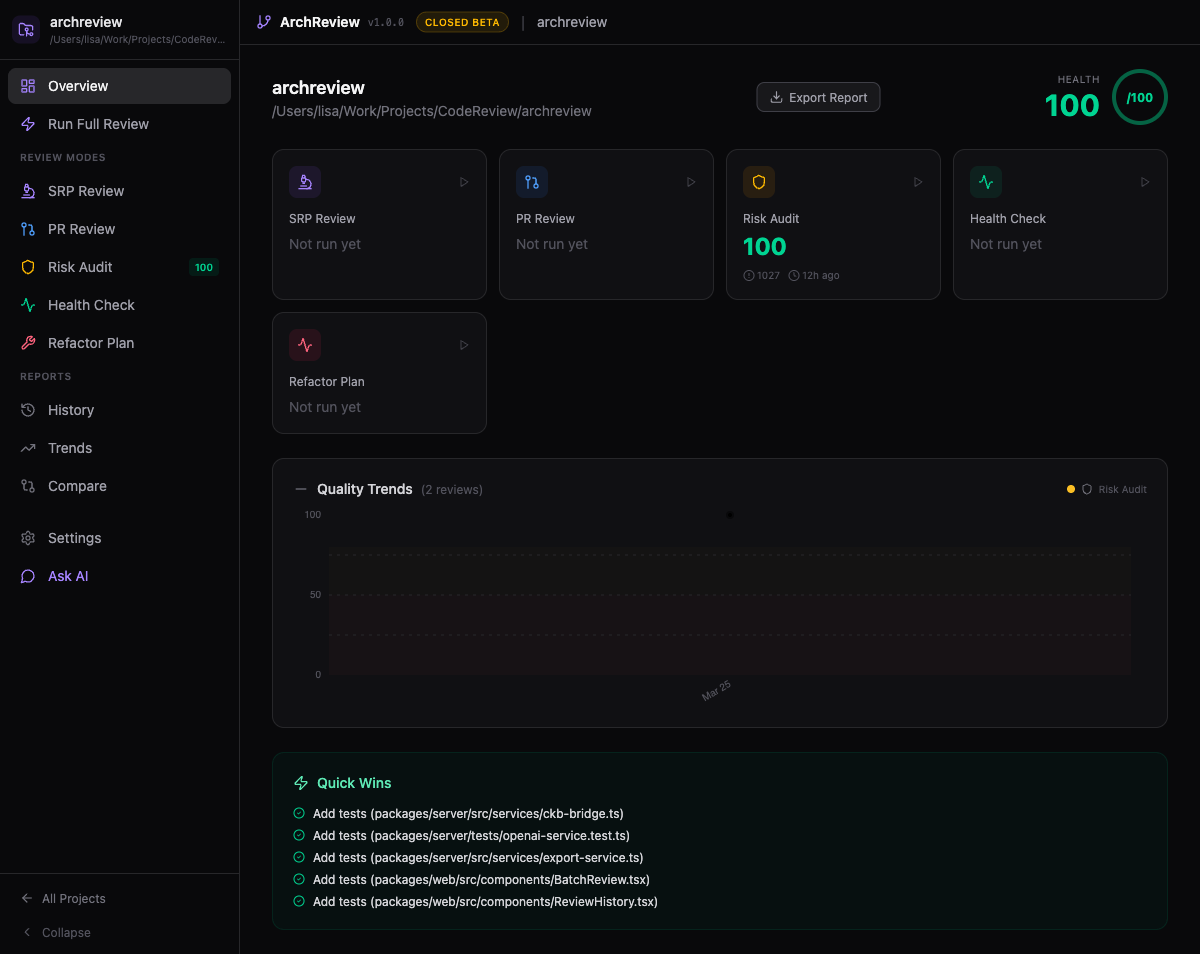
Navigation
The sidebar provides access to all sections:
Command Palette
Press Cmd+K to open the command palette. Fuzzy-search across all sections, modes, and actions.
Configuration
All settings are configured via environment variables. Single source of truth: packages/server/src/config.ts
| Variable | Default | Description |
|---|---|---|
| PORT | 3004 | Server API port |
| WEB_PORT | 5178 | Web dev server port |
| OPENAI_API_KEY | — | Required for AI-powered modes (SRP, PR semantic, Refactor) |
| OPENAI_MODEL | gpt-4o | Model for analysis. Also supports gpt-4o-mini, gpt-4-turbo, o3-mini |
| CKB_COMMAND | ckb | Path to CKB binary |
| ARCHREVIEW_DATA_DIR | ~/.archreview | Storage for projects, reports, cache, and settings |
| TOKEN_BUDGET | 100000 | Maximum tokens per review (prevents runaway costs) |
Project Setup
Projects persist settings, review history, and baselines. Stored in ~/.archreview/projects.json.
Create a project
In the web UI, click "New Project" and point it at your repository root. Or via the API:
What's stored per project
- Repository path and name
- Quality gate thresholds (min score, max criticals, max total findings)
- Custom architectural rules
- Dismissed finding fingerprints
- Baseline snapshots for clean-as-you-code
- Review history and trend data
Review Modes
ArchReview has 5 review modes, each targeting a different aspect of your codebase. Modes that don't require AI can run completely free with zero API costs.
SRP Review
AI RequiredDeep Single Responsibility Principle analysis. Detects files with too many responsibilities and proposes concrete fixes.
Pipeline
What you get
- • Violations — Fan-out/fan-in evidence, mixed import patterns, responsibility count per file
- • Abstractions — AI-proposed interfaces with TypeScript signatures and migration plans
- • Test contracts — Generated test skeletons with edge cases for each proposed abstraction
- • Migration plan — Phased adoption with dependency ordering
Cost note: This mode makes multiple LLM calls (analyze + design + specify). Use --depth quick for a faster, cheaper pass.
PR Review
AI OptionalFast PR quality gates designed for CI. 20 structural checks run in ~5 seconds; the AI layer only kicks in when issues are found.
Structural checks (CKB, no AI)
Smart early exit
If structural score ≥ 90, all checks pass, and the PR has < 100 changed lines, the LLM step is skipped entirely. Zero AI cost for clean PRs.
Output includes
- • Suggested reviewers with expertise areas
- • Review effort estimation (hours + complexity rating)
- • Health delta — which files degraded vs improved
- • Auto-fix suggestions for common patterns
Risk Audit
No AI8 risk factors scored against 20 compliance frameworks. Pure structural analysis via CKB — zero LLM cost.
Risk factors
Each factor has configurable severity thresholds and weights. The audit produces per-factor scores, overall compliance coverage, and quick wins with effort/impact sizing.
See Compliance Frameworks for the full list of 20 supported standards.
Health Check
No AISix independent checks that run in parallel, producing a 0–100 health score. All local, all free.
Refactor Plan
AI RequiredThe most comprehensive mode. Combines structural analysis with multi-persona AI review to generate a phased migration roadmap.
Pipeline (12 stages)
Analysis includes
- • Hotspots — Files ranked by churn × complexity
- • Temporal coupling — Files that change together in git but aren't structurally related
- • Bus factor — Knowledge concentration risk per file
- • 6 AI personas — Security Architect, Performance Engineer, API Designer, Junior Developer, Test Engineer, Data Engineer
- • Code smells — God Class, Feature Envy, Shotgun Surgery, Divergent Change (86.7% recall)
- • "What If" simulator — See blast radius of extracting a module before you do it
- • Phased roadmap — 3–5 phases with effort/risk/dependency analysis
Quality Gates
Configure pass/fail thresholds per project. When running in --ci mode, the exit code reflects whether the gate passed.
| Threshold | Default | Description |
|---|---|---|
| minScore | 70 | Minimum overall score (0–100) |
| maxCritical | 0 | Maximum critical findings allowed |
| maxTotal | 10 | Maximum total findings allowed |
Configure via the web UI (Settings → Quality Gates) or the tRPC API. In CI, a failing gate returns exit code 1.
Custom Rules
Define architectural rules in natural language. ArchReview evaluates them using the LLM during AI-powered reviews.
Examples
Add rules via the web UI (Settings → Architecture Rules) or the tRPC API. Rules are evaluated per-file during SRP and PR Review modes.
Baselines & Dismissals
Clean-as-you-code baseline
Snapshot your current findings as a baseline. Subsequent reviews only show new issues. Useful for adopting ArchReview on legacy codebases without being overwhelmed by existing debt.
Finding dismissal
Dismiss individual findings via the web UI. Dismissals are fingerprint-based (file + rule + line range) and survive across reviews — even if the line number shifts slightly.
Tip: Use baselines for bulk legacy issues. Use dismissals for individual false positives.
AI Chat
Conversational Q&A about your codebase. The AI has context from your latest review scores, findings, and project structure.
Starter suggestions
Supports markdown rendering and keeps the last 10 messages as context. Access via the sidebar chat icon or Cmd+Shift+C.
Export Formats
JSON
Full structured output with all findings, scores, metadata, and pipeline events. Best for programmatic consumption.
--format json
Markdown
Human-readable report with tables and code blocks. Ideal for PR comments, wikis, and documentation.
--format markdown
SARIF 2.1.0
GitHub Code Scanning compatible. Upload directly to the Security tab via the GitHub API or Actions.
--format sarif
CLI Reference
| Flag | Values | Description |
|---|---|---|
| --mode | srp-review | pr-review | risk-audit | health-check | refactor-plan | Review mode (required) |
| --depth | quick | normal | deep | Analysis depth. Default: normal |
| --format | json | markdown | sarif | Output format. Default: json |
| --output | <path> | Write report to file instead of stdout |
| --ci | CI mode: exit code 0 = pass, 1 = fail | |
| --frameworks | <list> | Comma-separated compliance frameworks for risk-audit |
| --personas | all | security,performance,api,junior,test,data | AI personas for refactor-plan |
| --project | <name> | Use saved project settings |
| --baseline | Compare against baseline (show only new findings) | |
| --verbose | Show pipeline events in real-time | |
| --version | Print version and exit | |
| --help | Show help |
GitHub Action
Run ArchReview on every pull request. Posts inline comments and optionally uploads SARIF to Code Scanning.
Basic setup
Action inputs
| Input | Default | Description |
|---|---|---|
| mode | pr-review | Review mode to run |
| sarif | false | Upload SARIF to GitHub Code Scanning |
| comment | true | Post review summary as PR comment |
| fail-on-gate | true | Fail the check if quality gate fails |
| baseline | false | Compare against project baseline |
Webhook API
Trigger reviews programmatically from any system.
Trigger a review
Poll for status
VS Code Extension
Get architectural feedback right in your editor without switching context.
Install
CI/CD Patterns
Gate-only (no AI cost)
Run Health Check in CI to enforce a minimum quality bar with zero API cost:
PR review with SARIF upload
Run PR Review, upload SARIF to GitHub Code Scanning, and fail the build if the gate fails:
Nightly audit
Run a full Risk Audit on a cron schedule and pipe the markdown report to Slack:
tRPC API
The server exposes a tRPC API for programmatic access. The web UI and CLI both use this API internally.
Routers
| Router | Key procedures |
|---|---|
| review | start (mutation), subscribe (subscription), getReport, listReports |
| project | create, update, delete, list, getSettings, updateSettings |
| settings | getApiKey, setApiKey, getGates, updateGates |
| source | getFile, listFiles, getSymbols |
| chat | send (mutation), getHistory |
| export | toMarkdown, toSarif, toJson |
Pipeline Events
All review modes are async generators that yield PipelineEvent objects. Subscribe via tRPC to receive real-time progress.
Type Reference
Core domain types are defined in packages/server/src/types/.
review.ts
pipeline.ts
report.ts
ckb.ts
settings.ts
project.ts
Compliance Frameworks
The Risk Audit mode supports 20 compliance frameworks grouped by category. Use --frameworks to select specific ones.
AI Personas
The Refactor Plan mode uses 6 specialized AI reviewer personas, each with focused system prompts.
Authentication, authorization, data exposure, injection, secrets
N+1 queries, memory leaks, caching, lazy loading, bundle size
Contract stability, versioning, error shapes, naming, pagination
Readability, confusing logic, missing docs, magic numbers, onboarding
Coverage gaps, flaky patterns, missing edge cases, test isolation
Schema design, migrations, query patterns, data integrity, indexing
Select personas via --personas security,test or use --personas all for all six.
Keyboard Shortcuts
Available in the web UI:
| 1–5 | Switch to review mode 1–5 |
| Cmd+K | Open command palette |
| Cmd+Shift+Enter | Run batch review |
| Cmd+Shift+C | Open AI chat |
| Cmd+E | Export current report |
| Esc | Close modal / palette |
Troubleshooting
CKB not found
Make sure CKB is installed and on your PATH. Run ckb --version to verify. Set CKB_COMMAND to an absolute path if needed.
OpenAI API key invalid
The key is validated on startup. Check that it starts with sk- and has billing enabled. The web UI will prompt you to re-enter it.
Port already in use
Use python3 launch.py which auto-finds free ports. Or set PORT / WEB_PORT manually.
Review takes too long
Use --depth quick for faster passes. Reduce TOKEN_BUDGET to limit LLM calls. Health Check and Risk Audit never call the LLM.
SARIF upload fails on GitHub
Ensure the repository has Code Scanning enabled (Settings → Security → Code scanning). The SARIF file must be under 10MB.
No findings on a large repo
Check that CKB has finished indexing. Run ckb status in the repo root. For SRP review, ensure the path points to a directory with source files.
Changelog
- + General availability with all 5 review modes
- + Sessions, tickets, clones, and test backfill
- + Strangler fig pattern for legacy modernization
- + Module trends UI and architecture conformance
- + DB coupling detection and refactoring diffs
- + 20 compliance frameworks in Risk Audit
- + Temporal coupling, bus factor, "What If" simulator
- + 6 AI reviewer personas for Refactor Plan
- + Code smell detection (86.7% recall)
- + Review comparison, history, and trend tracking
- + Custom rules, quality gates, baselines
- + AI chat, command palette, keyboard shortcuts
- + SARIF, Markdown, JSON export
- + GitHub Action, Webhook API, VS Code extension, CLI